Accept a payment
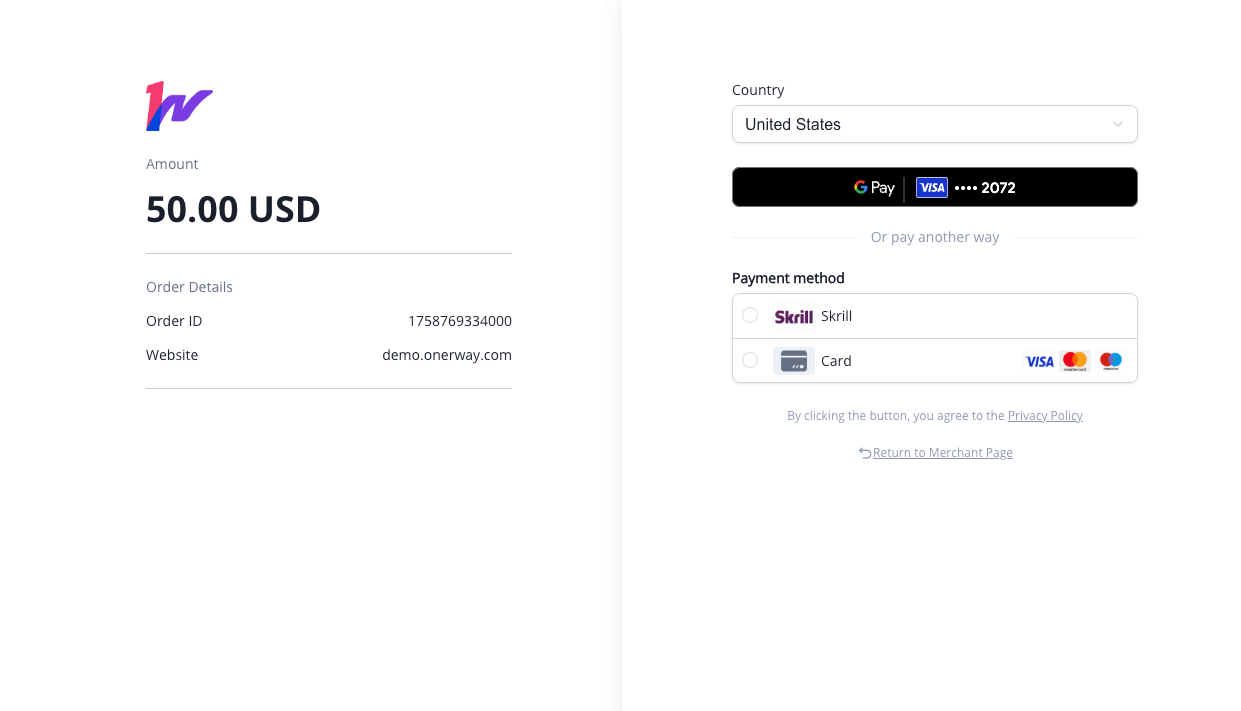
Redirect to a Onerway-hosted payment page using Onerway Checkout. See how this integration compares to Onerway's other integration types.
First, register for a Onerway account.
Get your API credentials and access the Onerway API from your application:
Add a checkout button to your website that calls a server-side endpoint to create a Checkout SessionAPI
<html>
  <head>
    <title>Buy cool new product</title>
  </head>
  <body>
    <button id="checkoutBtn" onclick="handleCheckout()">Checkout</button>

    <script>
      async function handleCheckout() {
        const button = document.getElementById('checkoutBtn')
        button.disabled = true
        button.textContent = 'Processing...'

        try {
          const response = await fetch('/create-checkout-session')
          const data = await response.json()

          if (data.success && data.redirectUrl) {
            // Redirect to Onerway Checkout page
            window.location.href = data.redirectUrl
          } else {
            alert('Checkout failed: ' + (data.error || 'Unknown error'))
            button.disabled = false
            button.textContent = 'Checkout'
          }
        } catch (error) {
          console.error('Error creating checkout session:', error)
          alert('Network error: ' + error.message)
          button.disabled = false
          button.textContent = 'Checkout'
        }
      }
    </script>
  </body>
</html>
<template>
  <button @click="createCheckoutSession" :disabled="isLoading">
    {{ isLoading ? 'Processing...' : 'Checkout' }}
  </button>
</template>

<script setup>
import { ref } from 'vue'

const isLoading = ref(false)

const createCheckoutSession = async () => {
  isLoading.value = true
  try {
    const response = await fetch('/create-checkout-session')
    const data = await response.json()

    if (data.success && data.redirectUrl) {
      // Redirect to Onerway Checkout page
      window.location.href = data.redirectUrl
    } else {
      console.error('Checkout failed:', data.error)
      alert('Checkout failed: ' + (data.error || 'Unknown error'))
    }
  } catch (error) {
    console.error('Error creating checkout session:', error)
    alert('Network error: ' + error.message)
  } finally {
    isLoading.value = false
  }
}
</script>
import { useState } from 'react'

function CheckoutButton() {
  const [isLoading, setIsLoading] = useState(false)

  const createCheckoutSession = async () => {
    setIsLoading(true)
    try {
      const response = await fetch('/create-checkout-session')
      const data = await response.json()

      if (data.success && data.redirectUrl) {
        // Redirect to Onerway Checkout page
        window.location.href = data.redirectUrl
      } else {
        console.error('Checkout failed:', data.error)
        alert('Checkout failed: ' + (data.error || 'Unknown error'))
      }
    } catch (error) {
      console.error('Error creating checkout session:', error)
      alert('Network error: ' + error.message)
    } finally {
      setIsLoading(false)
    }
  }

  return (
    <button onClick={createCheckoutSession} disabled={isLoading}>
      {isLoading ? 'Processing...' : 'Checkout'}
    </button>
  )
}

export default CheckoutButton
A Checkout Session encapsulates, in code, the entire customer payment journey triggered by a redirect to the hosted checkout form. You can configure it with options such as:
- Currencies to use
- Payment methods to offer
You must configure two important URLs in your Checkout Session:
notifyUrl webhook is your primary source of payment status updates for order fulfillment.returnUrl: The URL of a page on your website where customers are redirected after they complete the payment (successful or failed). This provides immediate feedback to the customer.notifyUrl: The webhook URL where Onerway sends payment events to your server. This ensures your server receives payment confirmations even if the customer doesn't return to your site.
After creating a Checkout Session, redirect your customer to the redirect URL returned in the response. Here's a demo of a server-side implementation:
Server-side Implementation (Java)
Add Maven Dependencies
First, add the required dependencies to your pom.xml:
<dependency>
  <groupId>com.sparkjava</groupId>
  <artifactId>spark-core</artifactId>
  <version>2.9.4</version>
</dependency>

<dependency>
  <groupId>com.fasterxml.jackson.core</groupId>
  <artifactId>jackson-databind</artifactId>
  <version>2.15.2</version>
</dependency>
Configure Base Settings
Set up your merchant configuration and constants:
import static spark.Spark.*;
import spark.Request;
import spark.Response;
import com.fasterxml.jackson.databind.JsonNode;
import com.fasterxml.jackson.databind.ObjectMapper;
// ... other imports

public class ServerDemo {
  private static final ObjectMapper JSON = new ObjectMapper();
  private static final String CHECKOUT_SESSION_URL = "https://sandbox-acq.onerway.com/txn/payment";
  private static final String MERCHANT_NO = "REPLACE_WITH_YOUR_MERCHANT_NO";
  private static final String DEFAULT_APP_ID = "REPLACE_WITH_YOUR_APP_ID";
  private static final String MERCHANT_SECRET = "REPLACE_WITH_YOUR_MERCHANT_SECRET";
  private static final String DEFAULT_RETURN_URL = "https://merchant.example.com/pay/return";
  private static final String DEFAULT_NOTIFY_URL = "https://merchant.example.com/pay/notify";

  private static final DateTimeFormatter DATETIME_FMT = DateTimeFormatter.ofPattern("yyyy-MM-dd HH:mm:ss");

  public static void main(String[] args) {
    port(8080);
    get("/create-checkout-session", ServerDemo::handleCheckoutSession);
  }
}
Create Payment Request Handler
Implement the main payment processing logic:
private static Object handleCheckoutSession(Request req, Response res) {
  res.type("application/json");

  // Build payment request data
  Map<String, String> body = buildPaymentBody(req);

  // Generate signature
  String signBase = buildSignBaseString(body, MERCHANT_SECRET);
  String sign = sha256Hex(signBase);
  body.put("sign", sign);

  try {
    String requestJson = toJson(body);

    // Send request to Onerway Checkout API
    String responseJson = postJson(CHECKOUT_SESSION_URL, requestJson);

    // Extract redirect URL
    String redirectUrl = extractRedirectUrl(responseJson);

    // Build response JSON
    Map<String, Object> result = new TreeMap<>();
    if (redirectUrl != null) {
      result.put("success", true);
      result.put("redirectUrl", redirectUrl);
    } else {
      result.put("success", false);
      result.put("error", "Failed to extract redirect URL from response");
      result.put("rawResponse", responseJson);
    }

    return toJson(result);
  } catch (Exception e) {
    Map<String, Object> error = new TreeMap<>();
    error.put("success", false);
    error.put("error", "Failed to create checkout session: " + e.getMessage());
    return toJson(error);
  }
}
Build Payment Request Data
Create the payment request payload with all required fields:
private static Map<String, String> buildPaymentBody(Request req) {
  String merchantTxnId = String.valueOf(System.currentTimeMillis());
  String merchantTxnTime = LocalDateTime.now().format(DATETIME_FMT);

  String appId = resolveAppId(req);
  String returnUrl = resolveReturnUrl(appId);
  String billingInformation = buildBillingInformation("US", "test@example.com");
  String txnOrderMsg = buildTxnOrderMsg(appId, returnUrl, DEFAULT_NOTIFY_URL, req.ip());

  Map<String, String> body = new TreeMap<>();
  body.put("billingInformation", billingInformation);
  body.put("merchantCustId", "DEMO-CUSTOMER-ID");
  body.put("merchantNo", MERCHANT_NO);
  body.put("merchantTxnId", merchantTxnId);
  body.put("merchantTxnTime", merchantTxnTime);
  body.put("orderAmount", "1");
  body.put("orderCurrency", "USD");
  body.put("productType", "CARD");
  body.put("shippingInformation", billingInformation);
  body.put("subProductType", "DIRECT");
  body.put("txnOrderMsg", txnOrderMsg);
  body.put("txnType", "SALE");
  return body;
}

private static String buildBillingInformation(String country, String email) {
  Map<String, Object> billing = new TreeMap<>();
  billing.put("country", country);
  billing.put("email", email);
  return toJson(billing);
}

private static String buildTxnOrderMsg(String appId, String returnUrl, String notifyUrl, String transactionIp) {
  List<Map<String, String>> products = new ArrayList<>();
  Map<String, String> product = new TreeMap<>();
  product.put("price", "110.00");
  product.put("num", "1");
  product.put("name", "iphone11");
  product.put("currency", "USD");
  products.add(product);

  String productsJson = toJson(products);

  Map<String, Object> txnOrder = new TreeMap<>();
  txnOrder.put("products", productsJson);
  txnOrder.put("appId", appId);
  txnOrder.put("returnUrl", returnUrl);
  txnOrder.put("notifyUrl", notifyUrl);
  txnOrder.put("transactionIp", transactionIp);
  return toJson(txnOrder);
}
Handle Signatures and API Communication
Implement signature generation and API communication:
// Signature generation following Onerway's specification
private static String buildSignBaseString(Map<String, String> params, String secret) {
  boolean refundRequest = isRefundRequest(params);
  StringBuilder sb = new StringBuilder();
  for (Map.Entry<String, String> entry : new TreeMap<>(params).entrySet()) {
    String key = entry.getKey();
    String value = entry.getValue();
    if (isNonEmpty(value) && !shouldFilterKey(key, refundRequest)) {
      sb.append(value);
    }
  }
  sb.append(secret);
  return sb.toString();
}

private static String sha256Hex(String input) {
  try {
    MessageDigest md = MessageDigest.getInstance("SHA-256");
    byte[] digest = md.digest(input.getBytes(StandardCharsets.UTF_8));
    return HexFormat.of().formatHex(digest); // JDK 17+
  } catch (NoSuchAlgorithmException e) {
    throw new RuntimeException("SHA-256 not available", e);
  }
}

// HTTP communication
private static String postJson(String url, String jsonBody) throws IOException, InterruptedException {
  HttpClient client = HttpClient.newHttpClient();
  HttpRequest request = HttpRequest.newBuilder()
    .uri(URI.create(url))
    .header("Content-Type", "application/json")
    .POST(HttpRequest.BodyPublishers.ofString(jsonBody, StandardCharsets.UTF_8))
    .build();
  HttpResponse<String> response = client.send(request,
    HttpResponse.BodyHandlers.ofString(StandardCharsets.UTF_8));
  return response.body();
}

// Response parsing - Generic field extraction
private static String extractJsonField(String responseJson, String path) {
  try {
    JsonNode node = JSON.readTree(responseJson);

    // Navigate through the path (e.g., "data.redirectUrl" -> ["data", "redirectUrl"])
    String[] pathParts = path.split("\\.");
    for (String part : pathParts) {
      node = node.path(part);
      if (node.isMissingNode()) {
        return null;
      }
    }

    // Extract text value
    if (node.isTextual()) {
      String value = node.asText().trim();
      if (isNonEmpty(value)) {
        return value;
      }
    } else if (node.isNumber()) {
      // Support number fields as well
      return node.asText();
    }
  } catch (Exception e) {
    System.err.println("Failed to extract field '" + path + "': " + e.getMessage());
  }
  return null;
}

// Extract redirect URL from API response
private static String extractRedirectUrl(String responseJson) {
  return extractJsonField(responseJson, "data.redirectUrl");
}

// Extract transaction ID from API response
private static String extractTransactionId(String responseJson) {
  return extractJsonField(responseJson, "data.transactionId");
}

// JSON utilities
private static String toJson(Object obj) {
  try {
    return JSON.writeValueAsString(obj);
  } catch (Exception e) {
    throw new RuntimeException(e);
  }
}

// Helper methods
private static boolean isRefundRequest(Map<String, String> params) {
  return params != null && params.containsKey("refundType");
}

private static boolean shouldFilterKey(String key, boolean refundRequest) {
  Set<String> EXCLUDED_KEYS_BASE = Set.of(
    "originMerchantTxnId", "customsDeclarationAmount", "customsDeclarationCurrency",
    "paymentMethod", "walletTypeName", "periodValue", "tokenExpireTime", "sign");
  return EXCLUDED_KEYS_BASE.contains(key) || (!refundRequest && "originTransactionId".equals(key));
}

private static String resolveAppId(Request req) {
  if (req == null) return DEFAULT_APP_ID;
  String[] candidates = {
    req.queryParams("appId"), req.queryParams("app_id"),
    req.headers("X-App-Id"), req.headers("appId")
  };
  for (String candidate : candidates) {
    if (candidate != null && !candidate.trim().isEmpty()) {
      return candidate.trim();
    }
  }
  return DEFAULT_APP_ID;
}

private static String resolveReturnUrl(String appId) {
  return DEFAULT_RETURN_URL;
}

private static boolean isNonEmpty(String value) {
  return value != null && (value.length() > 0 || "0".equals(value));
}
- Try it in a ready-to-run environment: Open in GitHub Codespaces
- Download ServerDemo.java
Payment methods
By default, Onerway enables cards and other common payment methods. In Checkout, Onerway evaluates the currency and any restrictions, then dynamically presents the supported payment methods to the customer.
To see which payment methods you support, access your application list. You can sort the payment methods to offer in the payment methods.
Checkout’s Onerway-hosted pages don’t need integration changes to enable Apple Pay or Google Pay. Onerway handles these payments the same way as other card payments.
Testing
- Start your server
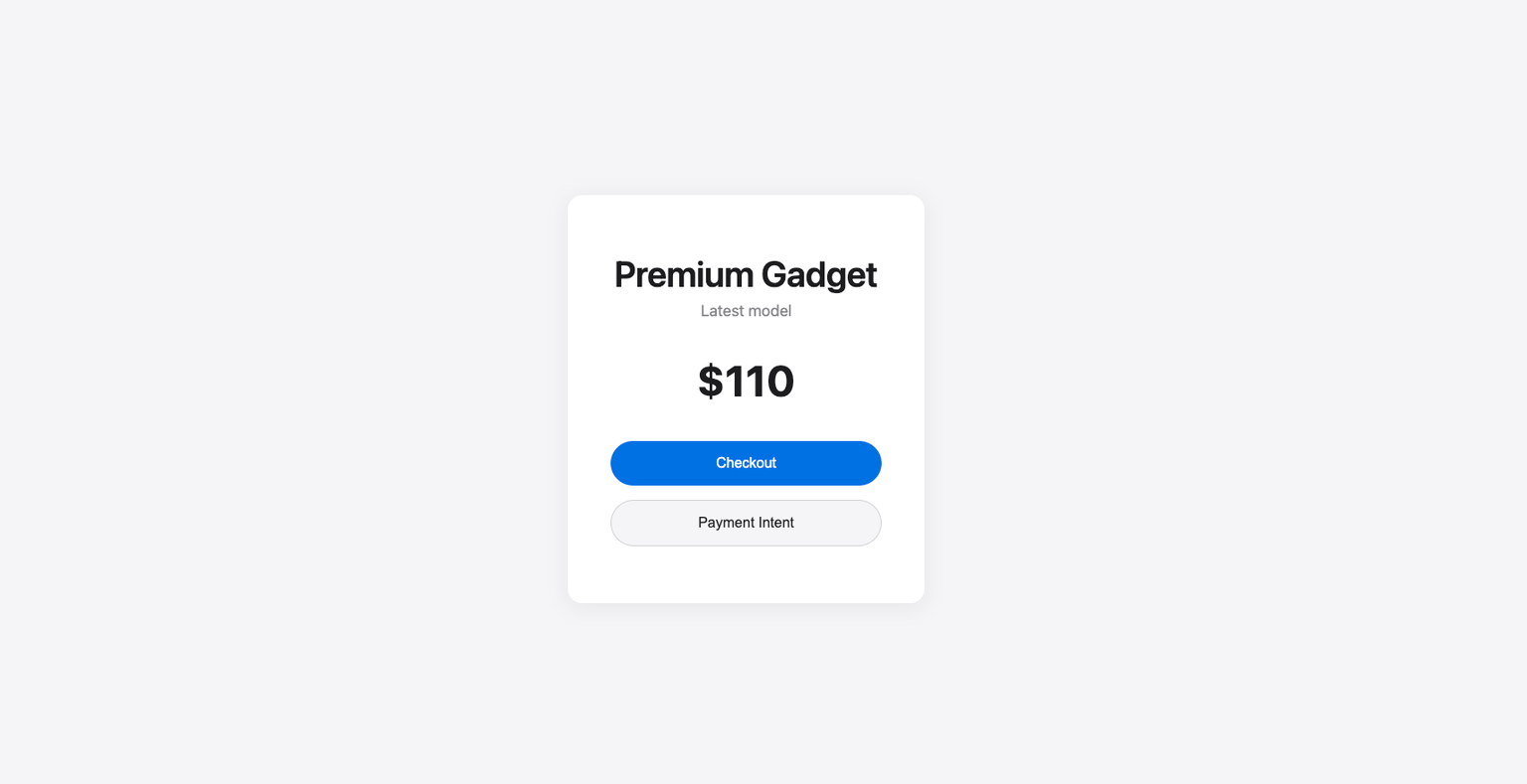
Navigate to http://localhost:8080 in your browser. You should see a simple purchase page that redirects your customer to Onerway Checkout:
- Go to the checkout page
Click the Checkout button. If everything is configured correctly, you'll be redirected to the Onerway checkout page where customers can complete their payment.
If you see the following response, it means your
MERCHANT_NO, DEFAULT_APP_ID, or MERCHANT_SECRET are not configured:{
"respCode": "40013",
"respMsg": "Abnormal parameters (cannot be read)",
"data": null
}
It's important for your customer to see a success page after they successfully submit the payment form. Set up the success page URL in your Checkout Session to redirect your customer to this success page.
Create a minimal success page:
<html>
  <head>
    <title>Thanks for your order!</title>
  </head>
  <body>
    <h1>Thanks for your order!</h1>
    <p>We appreciate your business!</p>
    <p>If you have any questions, please email
      <a href="mailto:orders@example.com">orders@example.com</a>.
    </p>
  </body>
</html>
Next, update the Checkout Session creation endpoint to use this new page:
private static Map<String, String> buildPaymentBody(Request req) {
    // ... other fields ...
    String returnUrl = resolveReturnUrl(appId);
    String txnOrderMsg = buildTxnOrderMsg(appId, returnUrl, DEFAULT_NOTIFY_URL, req.ip());

    Map<String, String> body = new TreeMap<>();
    // ... other fields ...
    body.put("txnOrderMsg", txnOrderMsg);
    return body;
}

private static String buildTxnOrderMsg(String appId, String returnUrl, String notifyUrl, String transactionIp) {
    // ... other fields ...
    Map<String, Object> txnOrder = new TreeMap<>();
    txnOrder.put("returnUrl", returnUrl); // success page URL
    return toJson(txnOrder);
}
Testing
- Click your pay button
- Fill out the payment form with the test card information:
- Card number: Enter
4000 0209 5159 5032 - Card expiry: Enter any future date
- CVC: Enter any 3-digit number
- Cardholder name: Enter your first and last name
- Click the Pay button
- You're redirected to the success page
Next, find the new payment in the Dashboard's transactions. Successful payments appear in the Dashboard’s list of payments. When you click a transaction, it takes you to the payment details page. This section contains billing information and the list of items purchased, which you can use to manually fulfill the order.
Onerway sends a TXNAPI event when a customer completes a Checkout Session payment. Follow the webhook guideAPI to receive and handle these events, which might trigger you to:
- Send an order confirmation email to your customer
- Log the sale in a database
- Start a shipping workflow
- Handle transaction status (
statusfield) when processing asynchronous notifications. The status indicates the payment result (e.g.,Sfor success)
Listen for these events rather than waiting for your customer to be redirected back to your website. Triggering fulfillment only from your Checkout landing page is unreliable. Setting up your integration to listen for asynchronous events allows you to accept different types of payment methods with a single integration.
To test your Onerway-hosted payment form integration:
- Create a Checkout
- Fill out the payment details with a method from the following table:
- Enter any future date for card expiry
- Enter any 3-digit number for CVC
- Enter cardholder name
- Click Pay. You’re redirected to your
returnUrl - Go to the Dashboard and look for the payment on the Transactions page. If your payment succeeded, you’ll see it in that list
- Click your payment to see more details, like a Checkout summary with billing information and the list of purchased items. You can use this information to fulfill the order.
| CARD NUMBER | SCENARIO | HOW TO TEST |
|---|---|---|
4761 3441 3614 1390 | The card payment succeeds and doesn’t require authentication | Fill out the credit card form using the credit card number with any expiration, CVC, and cardholder name |
4021 9371 9565 8141 | The card is declined with a decline code like insufficient_funds | Fill out the credit card form using the credit card number with any expiration, CVC, and cardholder name |
4000 0209 5159 5032 | The card payment requires authentication | Fill out the credit card form using the credit card number with any expiration, CVC, and cardholder name |
| PAYMENT METHOD | SCENARIO | HOW TO TEST |
|---|---|---|
| Alipay+ | Your customer successfully pays with a redirect-based and immediate notificationPayments API payment method | Choose any redirect-based payment method, fill out the required details, and confirm the payment. Then click Complete test payment on the redirect page |
| PAYMENT METHOD | SCENARIO | HOW TO TEST |
|---|---|---|
| Boleto, OXXO | Your customer pays with a Boleto or OXXO voucher | Select Boleto or OXXO as the payment method and submit the payment. Close the dialog after it appears. |
See TestingPayments API for additional information to test your integration.
Embed a prebuilt payment form on your site using Onerway SDK. See how this integration compares to Onerway's other integration types.
This is a demo for illustration purposes only. No real transactions will be processed.
First, register for a Onerway account.
Get your API credentials and access the Onerway API from your application:
If you've completed the Checkout Session setup above, the Maven dependencies, base configuration, and utility methods are identical. You can jump directly to Create Payment Intent Handler to see the key differences.
Your server creates a Payment IntentAPI that provides the necessary credentials for the client-side SDK to function. The server:
- Creates Payment Intent: Calls Onerway's API to create a transaction and obtain
transactionIdandredirectUrl - Returns SDK Credentials: Sends these credentials to your frontend for SDK initialization
Key Difference from Checkout Session:
| Integration | Endpoint | Returns | Frontend Action |
|---|---|---|---|
| Checkout Session | /create-checkout-session | redirectUrl | Direct redirect to hosted page |
| SDK Integration | /create-payment-intent | transactionId + redirectUrl | Initialize SDK component |
Server-side Implementation (Java)
Add Maven Dependencies
First, add the required dependencies to your pom.xml:
<dependency>
  <groupId>com.sparkjava</groupId>
  <artifactId>spark-core</artifactId>
  <version>2.9.4</version>
</dependency>

<dependency>
  <groupId>com.fasterxml.jackson.core</groupId>
  <artifactId>jackson-databind</artifactId>
  <version>2.15.2</version>
</dependency>
Configure Base Settings
Set up your merchant configuration and constants:
import static spark.Spark.*;
import spark.Request;
import spark.Response;
import com.fasterxml.jackson.databind.JsonNode;
import com.fasterxml.jackson.databind.ObjectMapper;
// ... other imports

public class ServerDemo {
  private static final ObjectMapper JSON = new ObjectMapper();
  private static final String PAYMENT_INTENT_URL = "https://sandbox-acq.onerway.com/v1/sdkTxn/doTransaction";
  private static final String MERCHANT_NO = "REPLACE_WITH_YOUR_MERCHANT_NO";
  private static final String DEFAULT_APP_ID = "REPLACE_WITH_YOUR_APP_ID";
  private static final String MERCHANT_SECRET = "REPLACE_WITH_YOUR_MERCHANT_SECRET";
  private static final String DEFAULT_RETURN_URL = "https://merchant.example.com/pay/return";
  private static final String DEFAULT_NOTIFY_URL = "https://merchant.example.com/pay/notify";

  private static final DateTimeFormatter DATETIME_FMT = DateTimeFormatter.ofPattern("yyyy-MM-dd HH:mm:ss");

  public static void main(String[] args) {
    port(8080);
    get("/create-payment-intent", ServerDemo::handlePaymentIntent);
  }
}
Create Payment Intent Handler
Implement the Payment Intent endpoint that returns both transactionId and redirectUrl for SDK initialization:
private static Object handlePaymentIntent(Request req, Response res) {
  res.type("application/json");

  // Build payment request data
  Map<String, String> body = buildPaymentBody(req);

  // Generate signature
  String signBase = buildSignBaseString(body, MERCHANT_SECRET);
  String sign = sha256Hex(signBase);
  body.put("sign", sign);

  try {
    String requestJson = toJson(body);

    // Send request to Onerway Payment Intent API
    String responseJson = postJson(PAYMENT_INTENT_URL, requestJson);

    // Extract transaction ID and redirect URL (both needed for SDK)
    String transactionId = extractTransactionId(responseJson);
    String redirectUrl = extractRedirectUrl(responseJson);

    // Build response JSON
    Map<String, Object> result = new TreeMap<>();
    if (redirectUrl != null && transactionId != null) {
      result.put("success", true);
      result.put("transactionId", transactionId);
      result.put("redirectUrl", redirectUrl);
    } else {
      result.put("success", false);
      result.put("error", "Failed to extract transaction data from response");
      result.put("rawResponse", responseJson);
    }

    return toJson(result);
  } catch (Exception e) {
    Map<String, Object> error = new TreeMap<>();
    error.put("success", false);
    error.put("error", "Failed to create payment intent: " + e.getMessage());
    return toJson(error);
  }
}
Build Payment Request Data
Create the payment request payload with all required fields:
private static Map<String, String> buildPaymentBody(Request req) {
  String merchantTxnId = String.valueOf(System.currentTimeMillis());
  String merchantTxnTime = LocalDateTime.now().format(DATETIME_FMT);

  String appId = resolveAppId(req);
  String returnUrl = resolveReturnUrl(appId);
  String billingInformation = buildBillingInformation("US", "test@example.com");
  String txnOrderMsg = buildTxnOrderMsg(appId, returnUrl, DEFAULT_NOTIFY_URL, req.ip());

  Map<String, String> body = new TreeMap<>();
  body.put("billingInformation", billingInformation);
  body.put("merchantCustId", "DEMO-CUSTOMER-ID");
  body.put("merchantNo", MERCHANT_NO);
  body.put("merchantTxnId", merchantTxnId);
  body.put("merchantTxnTime", merchantTxnTime);
  body.put("orderAmount", "1");
  body.put("orderCurrency", "USD");
  body.put("productType", "CARD");
  body.put("shippingInformation", billingInformation);
  body.put("subProductType", "DIRECT");
  body.put("txnOrderMsg", txnOrderMsg);
  body.put("txnType", "SALE");
  return body;
}

private static String buildBillingInformation(String country, String email) {
  Map<String, Object> billing = new TreeMap<>();
  billing.put("country", country);
  billing.put("email", email);
  return toJson(billing);
}

private static String buildTxnOrderMsg(String appId, String returnUrl, String notifyUrl, String transactionIp) {
  List<Map<String, String>> products = new ArrayList<>();
  Map<String, String> product = new TreeMap<>();
  product.put("price", "110.00");
  product.put("num", "1");
  product.put("name", "iphone11");
  product.put("currency", "USD");
  products.add(product);

  String productsJson = toJson(products);

  Map<String, Object> txnOrder = new TreeMap<>();
  txnOrder.put("products", productsJson);
  txnOrder.put("appId", appId);
  txnOrder.put("returnUrl", returnUrl);
  txnOrder.put("notifyUrl", notifyUrl);
  txnOrder.put("transactionIp", transactionIp);
  return toJson(txnOrder);
}
Handle Signatures and API Communication
Implement signature generation and API communication:
// Signature generation following Onerway's specification
private static String buildSignBaseString(Map<String, String> params, String secret) {
  boolean refundRequest = isRefundRequest(params);
  StringBuilder sb = new StringBuilder();
  for (Map.Entry<String, String> entry : new TreeMap<>(params).entrySet()) {
    String key = entry.getKey();
    String value = entry.getValue();
    if (isNonEmpty(value) && !shouldFilterKey(key, refundRequest)) {
      sb.append(value);
    }
  }
  sb.append(secret);
  return sb.toString();
}

private static String sha256Hex(String input) {
  try {
    MessageDigest md = MessageDigest.getInstance("SHA-256");
    byte[] digest = md.digest(input.getBytes(StandardCharsets.UTF_8));
    return HexFormat.of().formatHex(digest); // JDK 17+
  } catch (NoSuchAlgorithmException e) {
    throw new RuntimeException("SHA-256 not available", e);
  }
}

// HTTP communication
private static String postJson(String url, String jsonBody) throws IOException, InterruptedException {
  HttpClient client = HttpClient.newHttpClient();
  HttpRequest request = HttpRequest.newBuilder()
    .uri(URI.create(url))
    .header("Content-Type", "application/json")
    .POST(HttpRequest.BodyPublishers.ofString(jsonBody, StandardCharsets.UTF_8))
    .build();
  HttpResponse<String> response = client.send(request,
    HttpResponse.BodyHandlers.ofString(StandardCharsets.UTF_8));
  return response.body();
}

// Response parsing - Generic field extraction
private static String extractJsonField(String responseJson, String path) {
  try {
    JsonNode node = JSON.readTree(responseJson);

    // Navigate through the path (e.g., "data.redirectUrl" -> ["data", "redirectUrl"])
    String[] pathParts = path.split("\\.");
    for (String part : pathParts) {
      node = node.path(part);
      if (node.isMissingNode()) {
        return null;
      }
    }

    // Extract text value
    if (node.isTextual()) {
      String value = node.asText().trim();
      if (isNonEmpty(value)) {
        return value;
      }
    } else if (node.isNumber()) {
      // Support number fields as well
      return node.asText();
    }
  } catch (Exception e) {
    System.err.println("Failed to extract field '" + path + "': " + e.getMessage());
  }
  return null;
}

// Extract redirect URL from API response
private static String extractRedirectUrl(String responseJson) {
  return extractJsonField(responseJson, "data.redirectUrl");
}

// Extract transaction ID from API response
private static String extractTransactionId(String responseJson) {
  return extractJsonField(responseJson, "data.transactionId");
}

// JSON utilities
private static String toJson(Object obj) {
  try {
    return JSON.writeValueAsString(obj);
  } catch (Exception e) {
    throw new RuntimeException(e);
  }
}

// Helper methods
private static boolean isRefundRequest(Map<String, String> params) {
  return params != null && params.containsKey("refundType");
}

private static boolean shouldFilterKey(String key, boolean refundRequest) {
  Set<String> EXCLUDED_KEYS_BASE = Set.of(
    "originMerchantTxnId", "customsDeclarationAmount", "customsDeclarationCurrency",
    "paymentMethod", "walletTypeName", "periodValue", "tokenExpireTime", "sign");
  return EXCLUDED_KEYS_BASE.contains(key) || (!refundRequest && "originTransactionId".equals(key));
}

private static String resolveAppId(Request req) {
  if (req == null) return DEFAULT_APP_ID;
  String[] candidates = {
    req.queryParams("appId"), req.queryParams("app_id"),
    req.headers("X-App-Id"), req.headers("appId")
  };
  for (String candidate : candidates) {
    if (candidate != null && !candidate.trim().isEmpty()) {
      return candidate.trim();
    }
  }
  return DEFAULT_APP_ID;
}

private static String resolveReturnUrl(String appId) {
  return DEFAULT_RETURN_URL;
}

private static boolean isNonEmpty(String value) {
  return value != null && (value.length() > 0 || "0".equals(value));
}
{
  "success": true,
  "transactionId": "1919259367895859200",
  "redirectUrl": "https://sandbox-checkout-sdk.onerway.com"
}
Testing
- Start your server
Navigate to http://localhost:8080 in your browser. You should see a simple purchase page with two buttons:
- Create a Payment Intent
Click the Payment Intent button. If everything is configured correctly, you'll receive a JSON response with success: true, transactionId, and redirectUrl. These values will be used to initialize the Onerway SDK in the next step.
If you see the following response, it means your
MERCHANT_NO, DEFAULT_APP_ID, or MERCHANT_SECRET are not configured:{
"respCode": "40013",
"respMsg": "Abnormal parameters (cannot be read)",
"data": null
}
After creating a Payment Intent, use the returned transactionId and redirectUrl to initialize the Onerway SDK on your client. The SDK renders a secure payment form, handles customer input, and processes the payment.
Load the Onerway SDK
Include the Onerway SDK script on your payment page. Always load the SDK directly from the official CDN to remain PCI compliant and ensure you receive security updates.
Never bundle or host a copy of the SDK yourself. Always load it from
https://checkout-sdk.onerway.com/v3/ to maintain PCI DSS compliance and receive automatic security updates.Option 1: Static loading (recommended)
Add the script to the head of your HTML file or your application's root template:
<head>
  <title>Checkout</title>
  <script src="https://checkout-sdk.onerway.com/v3/"></script>
</head>
<!-- In your root App.vue or index.html -->
<script setup>
import { onMounted } from 'vue'

onMounted(() => {
  // Script will be available globally after loading
  if (!document.querySelector('script[src*="checkout-sdk.onerway.com"]')) {
    const script = document.createElement('script')
    script.src = 'https://checkout-sdk.onerway.com/v3/'
    document.head.appendChild(script)
  }
})
</script>
// In your root App.jsx or index.html
import { useEffect } from 'react'

function App() {
  useEffect(() => {
    // Load SDK once globally
    if (!document.querySelector('script[src*="checkout-sdk.onerway.com"]')) {
      const script = document.createElement('script')
      script.src = 'https://checkout-sdk.onerway.com/v3/'
      document.head.appendChild(script)
    }
  }, [])

  return <YourApp />
}
Option 2: Dynamic loading
If you prefer to load the SDK only when needed, you can load it dynamically in your payment component (shown in the examples below).
Initialize the SDK
Create a container element and initialize the SDK with your Payment Intent credentials.
If you loaded the SDK in your HTML
<head> or root app component (Option 1), the Pacypay constructor is already globally available. You can initialize it directly without loading the script again.If you're loading the SDK dynamically (Option 2), you'll need to load the script first, then initialize once it's loaded.<html>
<head>
<title>Checkout</title>
</head>
<body>
<div id="onerway-checkout"></div>
<script>
// Load the SDK script
const script = document.createElement('script')
script.src = 'https://checkout-sdk.onerway.com/v3/'
document.body.appendChild(script)
script.onload = async function() {
// Get Payment Intent credentials from your server
const response = await fetch('/create-payment-intent')
const { transactionId, redirectUrl } = await response.json()
// Initialize the SDK
const pacypay = new Pacypay(transactionId, {
container: 'onerway-checkout',
locale: 'en',
environment: 'sandbox',
mode: 'CARD',
redirectUrl: redirectUrl,
config: {
subProductType: 'DIRECT'
},
onPaymentCompleted: function(result) {
console.log('Payment result:', result)
// Handle payment result (see next section)
},
onError: function(error) {
console.error('Payment error:', error)
// Handle errors
}
})
}
</script>
</body>
</html>
<template>
  <div>
    <div v-if="isLoading">Loading payment form...</div>
    <div v-else-if="error" class="error">{{ error }}</div>
    <div id="onerway-checkout"></div>
  </div>
</template>

<script setup>
import { ref, onMounted } from 'vue'

const isLoading = ref(true)
const error = ref(null)
const sdkInstance = ref(null)

onMounted(async () => {
  try {
    // Load SDK script
    const script = document.createElement('script')
    script.src = 'https://checkout-sdk.onerway.com/v3/'
    document.body.appendChild(script)

    script.onload = async () => {
      // Get Payment Intent credentials from your server
      const response = await fetch('/create-payment-intent')
      const data = await response.json()

      // Initialize the SDK
      sdkInstance.value = new Pacypay(data.transactionId, {
        container: 'onerway-checkout',
        locale: 'en',
        environment: 'sandbox',
        mode: 'CARD',
        redirectUrl: data.redirectUrl,
        config: {
          subProductType: 'DIRECT'
        },
        onPaymentCompleted: (result) => {
          console.log('Payment result:', result)
          // Handle payment result (see next section)
        },
        onError: (err) => {
          error.value = err.message
        }
      })

      isLoading.value = false
    }
  } catch (err) {
    error.value = 'Failed to load payment form'
    isLoading.value = false
  }
})
</script>
import { useState, useEffect } from 'react'

function CheckoutForm() {
  const [isLoading, setIsLoading] = useState(true)
  const [error, setError] = useState(null)
  const [sdkInstance, setSdkInstance] = useState(null)

  useEffect(() => {
    let mounted = true

    const loadSDK = async () => {
      try {
        // Load SDK script
        const script = document.createElement('script')
        script.src = 'https://checkout-sdk.onerway.com/v3/'
        document.body.appendChild(script)

        script.onload = async () => {
          if (!mounted) return

          // Get Payment Intent credentials from your server
          const response = await fetch('/create-payment-intent')
          const data = await response.json()

          // Initialize the SDK
          const instance = new Pacypay(data.transactionId, {
            container: 'onerway-checkout',
            locale: 'en',
            environment: 'sandbox',
            mode: 'CARD',
            redirectUrl: data.redirectUrl,
            config: {
              subProductType: 'DIRECT'
            },
            onPaymentCompleted: (result) => {
              console.log('Payment result:', result)
              // Handle payment result (see next section)
            },
            onError: (err) => {
              setError(err.message)
            }
          })

          setSdkInstance(instance)
          setIsLoading(false)
        }
      } catch (err) {
        if (mounted) {
          setError('Failed to load payment form')
          setIsLoading(false)
        }
      }
    }

    loadSDK()

    return () => {
      mounted = false
    }
  }, [])

  if (isLoading) return <div>Loading payment form...</div>
  if (error) return <div className="error">{error}</div>

  return <div id="onerway-checkout"></div>
}

export default CheckoutForm
Handle payment results
The SDK calls your onPaymentCompleted callback when the customer completes the payment form. Handle different payment statuses appropriately:
onPaymentCompleted: function(result) {
  const { respCode, data } = result

  if (respCode === '20000') {
    // API call successful - check payment status
    switch (data.status) {
      case 'S':
        // Payment successful
        alert('Payment completed successfully!')
        window.location.href = '/order-confirmation'
        break

      case 'R':
        // Requires 3D Secure authentication
        // Redirect to authentication page
        // Customer will return to your returnUrl after completing 3DS
        window.location.href = data.redirectUrl
        break
    }
  } else {
    // Payment failed
    alert('Payment failed: ' + result.respMsg)
  }
}
const handlePaymentCompleted = (result) => {
  const { respCode, data } = result

  if (respCode === '20000') {
    // API call successful - check payment status
    switch (data.status) {
      case 'S':
        // Payment successful
        alert('Payment completed successfully!')
        window.location.href = '/order-confirmation'
        break

      case 'R':
        // Requires 3D Secure authentication
        // Redirect to authentication page
        // Customer will return to your returnUrl after completing 3DS
        window.location.href = data.redirectUrl
        break
    }
  } else {
    // Payment failed
    alert('Payment failed: ' + result.respMsg)
  }
}
const handlePaymentCompleted = (result) => {
  const { respCode, data } = result

  if (respCode === '20000') {
    // API call successful - check payment status
    switch (data.status) {
      case 'S':
        // Payment successful
        alert('Payment completed successfully!')
        window.location.href = '/order-confirmation'
        break

      case 'R':
        // Requires 3D Secure authentication
        // Redirect to authentication page
        // Customer will return to your returnUrl after completing 3DS
        window.location.href = data.redirectUrl
        break
    }
  } else {
    // Payment failed
    alert('Payment failed: ' + result.respMsg)
  }
}
Payment status codes:
| Status | Description | When it occurs |
|---|---|---|
S | Success | Payment completed successfully |
F | Failure | Payment failed (only in else branch when respCode !== '20000') |
R | Requires action | Customer needs to complete 3D Secure authentication |
When
status is R, redirect your customer to data.redirectUrl for 3D Secure authentication. After completing authentication:- The
onPaymentCompletedcallback will NOT be triggered again - The customer is automatically redirected to your
returnUrlwith query parameters appended:
transactionId: The transaction identifierstatus: Payment status (e.g.,Sfor success,Ffor failure)- Other order-related information
returnUrl page:// Example: Extract payment result from URL parameters on your return page
const urlParams = new URLSearchParams(window.location.search)
const transactionId = urlParams.get('transactionId')
const status = urlParams.get('status')
// Query YOUR backend to verify the final payment status
// Your backend should check its database (updated by webhook) or query Onerway's API
async function verifyPayment() {
const response = await fetch(`/api/payment/status?transactionId=${transactionId}`)
const data = await response.json()
if (data.status === 'S') {
window.location.href = '/order-confirmation'
} else if (data.status === 'F') {
window.location.href = '/payment-failed'
} else {
// Payment still processing, retry after delay
setTimeout(verifyPayment, 2000)
}
}
verifyPayment()
- Recommended: Wait for Onerway's webhook notification (covered in the next step)
- Alternative: Actively query Onerway's Transaction Query APIAPI with
transactionId
After 3DS authentication, the SDK callback is not triggered. Always verify payment status server-side:
- Without 3DS: SDK callback provides immediate frontend feedback; still verify via webhook server-side
- With 3DS: No SDK callback; frontend polls your backend API, which either:
- Checks its database (updated by Onerway webhook)
- Actively queries Onerway's Transaction Query APIAPI with
transactionId
Testing
- Load your payment page with the SDK initialized
- Enter test card information (use cards from the test table in step 4)
- Submit the payment
- For cards requiring 3DS (
4000 0209 5159 5032), you'll be redirected to complete authentication - After successful payment or 3DS completion, verify the payment appears in your Dashboard
Onerway sends a TXNAPI event when a customer completes a payment. Follow the webhook guideAPI to receive and handle these events, which might trigger you to:
- Send an order confirmation email to your customer
- Log the sale in a database
- Start a shipping workflow
- Handle transaction status (
statusfield) when processing asynchronous notifications. The status indicates the payment result (e.g.,Sfor success)
Listen for these events rather than waiting for your customer to be redirected back to your website. Triggering fulfillment only from your return page is unreliable. Setting up your integration to listen for asynchronous events allows you to accept different types of payment methods with a single integration.
To test your SDK integration:
- Create a Payment Intent by calling your
/create-payment-intentendpoint - Initialize the Onerway SDK with the returned
transactionIdandredirectUrl - Fill out the payment details with a method from the following table:
- Enter any future date for card expiry
- Enter any 3-digit number for CVC
- Enter cardholder name
- Click Pay. The SDK will process the payment
- Go to the Dashboard and look for the payment on the Transactions page. If your payment succeeded, you'll see it in that list
- Click your payment to see more details, like billing information and the list of purchased items. You can use this information to fulfill the order.
| CARD NUMBER | SCENARIO | HOW TO TEST |
|---|---|---|
4761 3441 3614 1390 | The card payment succeeds and doesn't require authentication | Fill out the credit card form using the credit card number with any expiration, CVC, and cardholder name |
4021 9371 9565 8141 | The card is declined with a decline code like insufficient_funds | Fill out the credit card form using the credit card number with any expiration, CVC, and cardholder name |
4000 0209 5159 5032 | The card payment requires authentication | Fill out the credit card form using the credit card number with any expiration, CVC, and cardholder name |
See TestingPayments API for additional information to test your integration.
This integration method requires you to handle sensitive card data directly, which means you must:
- Maintain a valid PCI DSS certification
- Implement proper encryption and security measures
- Never store sensitive authentication data (CVV codes)
Build a custom payment form with complete control over UI and payment flow using the Direct PaymentAPI.
This is a demo for illustration purposes only. No real transactions will be processed.
First, register for a Onerway account.
Get your API credentials and access the Onerway API from your application:
A Payment Intent represents your intent to collect payment from a customer. Your server creates the Payment Intent with payment details and card information, then returns the transaction status or a 3DS redirect URL to the client.
Server-side Implementation (Java)
Add Maven Dependencies
First, add the required dependencies to your pom.xml:
<dependency>
  <groupId>com.sparkjava</groupId>
  <artifactId>spark-core</artifactId>
  <version>2.9.4</version>
</dependency>

<dependency>
  <groupId>com.fasterxml.jackson.core</groupId>
  <artifactId>jackson-databind</artifactId>
  <version>2.15.2</version>
</dependency>
Configure Base Settings
Set up your merchant configuration with the Direct Payment API endpoint:
import static spark.Spark.*;
import spark.Request;
import spark.Response;
import com.fasterxml.jackson.databind.JsonNode;
import com.fasterxml.jackson.databind.ObjectMapper;
// ... other imports

public class ServerDemo {
  private static final ObjectMapper JSON = new ObjectMapper();
  private static final String DIRECT_PAYMENT_URL = "https://sandbox-acq.onerway.com/v1/txn/doTransaction";
  private static final String MERCHANT_NO = "REPLACE_WITH_YOUR_MERCHANT_NO";
  private static final String DEFAULT_APP_ID = "REPLACE_WITH_YOUR_APP_ID";
  private static final String MERCHANT_SECRET = "REPLACE_WITH_YOUR_MERCHANT_SECRET";
  private static final String DEFAULT_RETURN_URL = "https://merchant.example.com/pay/return";
  private static final String DEFAULT_NOTIFY_URL = "https://merchant.example.com/pay/notify";

  private static final DateTimeFormatter DATETIME_FMT = DateTimeFormatter.ofPattern("yyyy-MM-dd HH:mm:ss");

  public static void main(String[] args) {
    port(8080);
    post("/create-direct-payment", ServerDemo::handleDirectPayment);
  }
}
Create Direct Payment Handler
Implement the payment endpoint that processes card data and returns the transaction result:
private static Object handleDirectPayment(Request req, Response res) {
  res.type("application/json");

  // Parse card information from client request
  String requestBody = req.body();
  Map<String, String> clientData = JSON.readValue(requestBody,
    new TypeReference<Map<String, String>>() {});

  // Build payment request with card information
  Map<String, String> body = buildPaymentBodyWithCardInfo(clientData);

  // Generate signature
  String signBase = buildSignBaseString(body, MERCHANT_SECRET);
  String sign = sha256Hex(signBase);
  body.put("sign", sign);

  try {
    String requestJson = toJson(body);

    // Send request to Onerway Direct Payment API
    String responseJson = postJson(DIRECT_PAYMENT_URL, requestJson);

    // Parse response
    JsonNode responseNode = JSON.readTree(responseJson);
    String respCode = responseNode.path("respCode").asText();

    // Build client response
    Map<String, Object> result = new TreeMap<>();
    if ("20000".equals(respCode)) {
      result.put("success", true);
      result.put("data", responseNode.path("data"));
    } else {
      result.put("success", false);
      result.put("error", responseNode.path("respMsg").asText());
    }

    return toJson(result);
  } catch (Exception e) {
    Map<String, Object> error = new TreeMap<>();
    error.put("success", false);
    error.put("error", "Failed to process payment: " + e.getMessage());
    return toJson(error);
  }
}
- Never log or store the complete card number or CVV
- Always validate card data on the server side
- Use HTTPS for all communication
- Implement rate limiting to prevent abuse
Build Payment Request with Card Info
Create the payment request payload including sensitive card data:
private static Map<String, String> buildPaymentBodyWithCardInfo(
    Map<String, String> clientData) {
  String merchantTxnId = String.valueOf(System.currentTimeMillis());
  String merchantTxnTime = LocalDateTime.now().format(DATETIME_FMT);

  String appId = DEFAULT_APP_ID;
  String billingInformation = buildBillingInformation(
    clientData.getOrDefault("country", "US"),
    clientData.getOrDefault("email", "customer@example.com")
  );

  // Build card information JSON
  String cardInfo = buildCardInfo(
    clientData.get("cardNumber"),
    clientData.get("cvv"),
    clientData.get("month"),
    clientData.get("year"),
    clientData.get("holderName")
  );

  String txnOrderMsg = buildTxnOrderMsg(
    appId,
    DEFAULT_RETURN_URL,
    DEFAULT_NOTIFY_URL,
    clientData.getOrDefault("ip", "127.0.0.1")
  );

  Map<String, String> body = new TreeMap<>();
  body.put("billingInformation", billingInformation);
  body.put("cardInfo", cardInfo);
  body.put("merchantCustId", "DEMO-CUSTOMER-ID");
  body.put("merchantNo", MERCHANT_NO);
  body.put("merchantTxnId", merchantTxnId);
  body.put("merchantTxnTime", merchantTxnTime);
  body.put("orderAmount", clientData.getOrDefault("amount", "100.00"));
  body.put("orderCurrency", clientData.getOrDefault("currency", "USD"));
  body.put("productType", "CARD");
  body.put("shippingInformation", billingInformation);
  body.put("subProductType", "DIRECT");
  body.put("txnOrderMsg", txnOrderMsg);
  body.put("txnType", "SALE");
  return body;
}

private static String buildCardInfo(String cardNumber, String cvv,
    String month, String year, String holderName) {
  Map<String, String> cardInfo = new TreeMap<>();
  cardInfo.put("cardNumber", cardNumber);
  cardInfo.put("cvv", cvv);
  cardInfo.put("month", month);
  cardInfo.put("year", year);
  cardInfo.put("holderName", holderName);
  return toJson(cardInfo);
}

private static String buildBillingInformation(String country, String email) {
  Map<String, Object> billing = new TreeMap<>();
  billing.put("country", country);
  billing.put("email", email);
  billing.put("firstName", "John");
  billing.put("lastName", "Doe");
  return toJson(billing);
}

private static String buildTxnOrderMsg(String appId, String returnUrl,
    String notifyUrl, String transactionIp) {
  List<Map<String, String>> products = new ArrayList<>();
  Map<String, String> product = new TreeMap<>();
  product.put("price", "100.00");
  product.put("num", "1");
  product.put("name", "Premium Product");
  product.put("currency", "USD");
  products.add(product);

  String productsJson = toJson(products);

  Map<String, Object> txnOrder = new TreeMap<>();
  txnOrder.put("products", productsJson);
  txnOrder.put("appId", appId);
  txnOrder.put("returnUrl", returnUrl);
  txnOrder.put("notifyUrl", notifyUrl);
  txnOrder.put("transactionIp", transactionIp);
  return toJson(txnOrder);
}
Handle Signatures and API Communication
Implement signature generation and API communication:
// Signature generation following Onerway's specification
private static String buildSignBaseString(Map<String, String> params, String secret) {
  boolean refundRequest = isRefundRequest(params);
  StringBuilder sb = new StringBuilder();
  for (Map.Entry<String, String> entry : new TreeMap<>(params).entrySet()) {
    String key = entry.getKey();
    String value = entry.getValue();
    if (isNonEmpty(value) && !shouldFilterKey(key, refundRequest)) {
      sb.append(value);
    }
  }
  sb.append(secret);
  return sb.toString();
}

private static String sha256Hex(String input) {
  try {
    MessageDigest md = MessageDigest.getInstance("SHA-256");
    byte[] digest = md.digest(input.getBytes(StandardCharsets.UTF_8));
    return HexFormat.of().formatHex(digest); // JDK 17+
  } catch (NoSuchAlgorithmException e) {
    throw new RuntimeException("SHA-256 not available", e);
  }
}

// HTTP communication
private static String postJson(String url, String jsonBody)
    throws IOException, InterruptedException {
  HttpClient client = HttpClient.newHttpClient();
  HttpRequest request = HttpRequest.newBuilder()
    .uri(URI.create(url))
    .header("Content-Type", "application/json")
    .POST(HttpRequest.BodyPublishers.ofString(jsonBody, StandardCharsets.UTF_8))
    .build();
  HttpResponse<String> response = client.send(request,
    HttpResponse.BodyHandlers.ofString(StandardCharsets.UTF_8));
  return response.body();
}

// JSON utilities
private static String toJson(Object obj) {
  try {
    return JSON.writeValueAsString(obj);
  } catch (Exception e) {
    throw new RuntimeException(e);
  }
}

// Helper methods
private static boolean isRefundRequest(Map<String, String> params) {
  return params != null && params.containsKey("refundType");
}

private static boolean shouldFilterKey(String key, boolean refundRequest) {
  Set<String> EXCLUDED_KEYS_BASE = Set.of(
    "originMerchantTxnId", "customsDeclarationAmount",
    "customsDeclarationCurrency", "paymentMethod", "walletTypeName",
    "periodValue", "tokenExpireTime", "sign", "cardInfo");
  return EXCLUDED_KEYS_BASE.contains(key) ||
    (!refundRequest && "originTransactionId".equals(key));
}

private static boolean isNonEmpty(String value) {
  return value != null && (value.length() > 0 || "0".equals(value));
}
- API Endpoint: Uses
/v1/txn/doTransactioninstead of/txn/payment - Card Data: Includes
cardInfoparameter with sensitive card details - PCI Scope: Your server handles raw card data (requires PCI compliance)
- Response Handling: May return
status=Rfor 3DS authentication
Understanding the Response
The API returns a response with the transaction status:
{
  "respCode": "20000",
  "respMsg": "Success",
  "data": {
    "transactionId": "1919652333131005952",
    "status": "S",  // or "R" for 3DS required
    "redirectUrl": null,  // populated when status is "R"
    "actionType": null,  // "RedirectURL" when 3DS required
    // ... other fields
  }
}
Response status values:
| Status | Description | Client Action |
|---|---|---|
S | Payment succeeded | Show confirmation page |
R | Requires 3DS authentication | Redirect to redirectUrl |
F | Payment failed | Show error, allow retry |
Create a custom payment form to collect card information from your customers. You have complete control over the design and user experience, but you're responsible for implementing security best practices.
- Always use HTTPS in production
- Never log or store complete card numbers or CVV codes
- Validate card data on the server, not just the client
- Implement CSRF protection
- Use Content Security Policy (CSP) headers
HTML Payment Form
Create a payment form that collects the necessary card information:
<!DOCTYPE html>
<html>
  <head>
    <title>Checkout</title>
    <style>
      .form-group { margin-bottom: 15px; }
      .form-group label { display: block; margin-bottom: 5px; font-weight: bold; }
      .form-group input { width: 100%; padding: 8px; font-size: 16px; border: 1px solid #ddd; border-radius: 4px; }
      .error { color: red; margin-top: 5px; font-size: 14px; }
      button { background: #5469d4; color: white; padding: 12px 24px; border: none; border-radius: 4px; font-size: 16px; cursor: pointer; width: 100%; }
      button:disabled { background: #ccc; cursor: not-allowed; }
      .card-row { display: flex; gap: 10px; }
      .card-row .form-group { flex: 1; }
    </style>
  </head>
  <body>
    <h1>Complete Your Payment</h1>
    <form id="payment-form">
      <div class="form-group">
        <label for="card-number">Card Number</label>
        <input
          type="text"
          id="card-number"
          placeholder="4111 1111 1111 1111"
          maxlength="19"
          required
        />
        <div class="error" id="card-number-error"></div>
      </div>

      <div class="card-row">
        <div class="form-group">
          <label for="expiry-month">Expiry Month</label>
          <input
            type="text"
            id="expiry-month"
            placeholder="MM"
            maxlength="2"
            required
          />
        </div>
        <div class="form-group">
          <label for="expiry-year">Expiry Year</label>
          <input
            type="text"
            id="expiry-year"
            placeholder="YYYY"
            maxlength="4"
            required
          />
        </div>
        <div class="form-group">
          <label for="cvv">CVV</label>
          <input
            type="text"
            id="cvv"
            placeholder="123"
            maxlength="4"
            required
          />
        </div>
      </div>

      <div class="form-group">
        <label for="cardholder-name">Cardholder Name</label>
        <input
          type="text"
          id="cardholder-name"
          placeholder="John Doe"
          required
        />
      </div>

      <div class="form-group">
        <label for="email">Email</label>
        <input
          type="email"
          id="email"
          placeholder="customer@example.com"
          required
        />
      </div>

      <button type="submit" id="submit-button">Pay $100.00</button>
      <div class="error" id="form-error"></div>
    </form>

    <script>
      document.getElementById('payment-form').addEventListener('submit', async (e) => {
        e.preventDefault();

        const submitButton = document.getElementById('submit-button');
        const formError = document.getElementById('form-error');

        // Disable button and show loading state
        submitButton.disabled = true;
        submitButton.textContent = 'Processing...';
        formError.textContent = '';

        // Format card number (remove spaces)
        const cardNumber = document.getElementById('card-number').value.replace(/\s/g, '');

        // Collect payment data
        const paymentData = {
          cardNumber: cardNumber,
          cvv: document.getElementById('cvv').value,
          month: document.getElementById('expiry-month').value.padStart(2, '0'),
          year: document.getElementById('expiry-year').value,
          holderName: document.getElementById('cardholder-name').value,
          email: document.getElementById('email').value,
          amount: '100.00',
          currency: 'USD',
          ip: '' // Server will add the actual IP
        };

        try {
          // Send payment data to your server
          const response = await fetch('/create-direct-payment', {
            method: 'POST',
            headers: {
              'Content-Type': 'application/json'
            },
            body: JSON.stringify(paymentData)
          });

          const result = await response.json();

          if (result.success && result.data) {
            const status = result.data.status;
            const actionType = result.data.actionType;

            if (status === 'S') {
              // Payment succeeded
              window.location.href = '/order-confirmation?txn=' + result.data.transactionId;
            } else if (status === 'R' && actionType === 'RedirectURL') {
              // 3DS authentication required
              window.location.href = result.data.redirectUrl;
            } else {
              // Payment failed
              formError.textContent = result.data.respMsg || 'Payment failed. Please try again.';
              submitButton.disabled = false;
              submitButton.textContent = 'Pay $100.00';
            }
          } else {
            formError.textContent = result.error || 'An error occurred. Please try again.';
            submitButton.disabled = false;
            submitButton.textContent = 'Pay $100.00';
          }
        } catch (error) {
          console.error('Payment error:', error);
          formError.textContent = 'Network error. Please check your connection and try again.';
          submitButton.disabled = false;
          submitButton.textContent = 'Pay $100.00';
        }
      });

      // Format card number with spaces as user types
      document.getElementById('card-number').addEventListener('input', (e) => {
        let value = e.target.value.replace(/\s/g, '');
        let formattedValue = value.match(/.{1,4}/g)?.join(' ') || value;
        e.target.value = formattedValue;
      });

      // Only allow numbers in card number field
      document.getElementById('card-number').addEventListener('keypress', (e) => {
        if (!/[0-9\s]/.test(e.key)) {
          e.preventDefault();
        }
      });

      // Only allow numbers in CVV and expiry fields
      ['cvv', 'expiry-month', 'expiry-year'].forEach(id => {
        document.getElementById(id).addEventListener('keypress', (e) => {
          if (!/[0-9]/.test(e.key)) {
            e.preventDefault();
          }
        });
      });
    </script>
  </body>
</html>
- Input formatting: Format card numbers with spaces for better readability
- Input validation: Validate on both client and server side
- Error handling: Provide clear, actionable error messages
- Loading states: Disable the submit button during processing
- Mobile optimization: Use
font-size: 16pxto prevent zoom on iOS
Framework Examples (Optional)
If you're using a JavaScript framework, here are equivalent implementations:
<template>
  <div>
    <h1>Complete Your Payment</h1>
    <form @submit.prevent="handleSubmit">
      <div class="form-group">
        <label for="card-number">Card Number</label>
        <input
          v-model="cardNumber"
          type="text"
          id="card-number"
          placeholder="4111 1111 1111 1111"
          maxlength="19"
          @input="formatCardNumber"
          required
        />
      </div>

      <div class="card-row">
        <div class="form-group">
          <label>Expiry Month</label>
          <input v-model="expiryMonth" placeholder="MM" maxlength="2" required />
        </div>
        <div class="form-group">
          <label>Expiry Year</label>
          <input v-model="expiryYear" placeholder="YYYY" maxlength="4" required />
        </div>
        <div class="form-group">
          <label>CVV</label>
          <input v-model="cvv" placeholder="123" maxlength="4" required />
        </div>
      </div>

      <div class="form-group">
        <label>Cardholder Name</label>
        <input v-model="cardholderName" placeholder="John Doe" required />
      </div>

      <div class="form-group">
        <label>Email</label>
        <input v-model="email" type="email" placeholder="customer@example.com" required />
      </div>

      <button type="submit" :disabled="isLoading">
        {{ isLoading ? 'Processing...' : 'Pay $100.00' }}
      </button>
      <div v-if="error" class="error">{{ error }}</div>
    </form>
  </div>
</template>

<script setup>
import { ref } from 'vue'

const cardNumber = ref('')
const expiryMonth = ref('')
const expiryYear = ref('')
const cvv = ref('')
const cardholderName = ref('')
const email = ref('')
const isLoading = ref(false)
const error = ref('')

const formatCardNumber = (e) => {
  let value = e.target.value.replace(/\s/g, '')
  cardNumber.value = value.match(/.{1,4}/g)?.join(' ') || value
}

const handleSubmit = async () => {
  isLoading.value = true
  error.value = ''

  try {
    const response = await fetch('/create-direct-payment', {
      method: 'POST',
      headers: { 'Content-Type': 'application/json' },
      body: JSON.stringify({
        cardNumber: cardNumber.value.replace(/\s/g, ''),
        cvv: cvv.value,
        month: expiryMonth.value.padStart(2, '0'),
        year: expiryYear.value,
        holderName: cardholderName.value,
        email: email.value,
        amount: '100.00',
        currency: 'USD'
      })
    })

    const result = await response.json()

    if (result.success && result.data) {
      if (result.data.status === 'S') {
        window.location.href = '/order-confirmation?txn=' + result.data.transactionId
      } else if (result.data.status === 'R' && result.data.actionType === 'RedirectURL') {
        window.location.href = result.data.redirectUrl
      } else {
        error.value = result.data.respMsg || 'Payment failed. Please try again.'
      }
    } else {
      error.value = result.error || 'An error occurred. Please try again.'
    }
  } catch (err) {
    console.error('Payment error:', err)
    error.value = 'Network error. Please check your connection and try again.'
  } finally {
    isLoading.value = false
  }
}
</script>

<style scoped>
.form-group { margin-bottom: 15px; }
.form-group label { display: block; margin-bottom: 5px; font-weight: bold; }
.form-group input { width: 100%; padding: 8px; font-size: 16px; border: 1px solid #ddd; border-radius: 4px; }
.error { color: red; margin-top: 10px; }
button { background: #5469d4; color: white; padding: 12px 24px; border: none; border-radius: 4px; font-size: 16px; cursor: pointer; width: 100%; }
button:disabled { background: #ccc; cursor: not-allowed; }
.card-row { display: flex; gap: 10px; }
</style>
import { useState } from 'react'

function PaymentForm() {
  const [cardNumber, setCardNumber] = useState('')
  const [expiryMonth, setExpiryMonth] = useState('')
  const [expiryYear, setExpiryYear] = useState('')
  const [cvv, setCvv] = useState('')
  const [cardholderName, setCardholderName] = useState('')
  const [email, setEmail] = useState('')
  const [isLoading, setIsLoading] = useState(false)
  const [error, setError] = useState('')

  const formatCardNumber = (value) => {
    const cleaned = value.replace(/\s/g, '')
    const formatted = cleaned.match(/.{1,4}/g)?.join(' ') || cleaned
    setCardNumber(formatted)
  }

  const handleSubmit = async (e) => {
    e.preventDefault()
    setIsLoading(true)
    setError('')

    try {
      const response = await fetch('/create-direct-payment', {
        method: 'POST',
        headers: { 'Content-Type': 'application/json' },
        body: JSON.stringify({
          cardNumber: cardNumber.replace(/\s/g, ''),
          cvv,
          month: expiryMonth.padStart(2, '0'),
          year: expiryYear,
          holderName: cardholderName,
          email,
          amount: '100.00',
          currency: 'USD'
        })
      })

      const result = await response.json()

      if (result.success && result.data) {
        if (result.data.status === 'S') {
          window.location.href = '/order-confirmation?txn=' + result.data.transactionId
        } else if (result.data.status === 'R' && result.data.actionType === 'RedirectURL') {
          window.location.href = result.data.redirectUrl
        } else {
          setError(result.data.respMsg || 'Payment failed. Please try again.')
        }
      } else {
        setError(result.error || 'An error occurred. Please try again.')
      }
    } catch (err) {
      console.error('Payment error:', err)
      setError('Network error. Please check your connection and try again.')
    } finally {
      setIsLoading(false)
    }
  }

  return (
    <div>
      <h1>Complete Your Payment</h1>
      <form onSubmit={handleSubmit}>
        <div className="form-group">
          <label>Card Number</label>
          <input
            type="text"
            value={cardNumber}
            onChange={(e) => formatCardNumber(e.target.value)}
            placeholder="4111 1111 1111 1111"
            maxLength="19"
            required
          />
        </div>

        <div className="card-row">
          <div className="form-group">
            <label>Expiry Month</label>
            <input
              value={expiryMonth}
              onChange={(e) => setExpiryMonth(e.target.value)}
              placeholder="MM"
              maxLength="2"
              required
            />
          </div>
          <div className="form-group">
            <label>Expiry Year</label>
            <input
              value={expiryYear}
              onChange={(e) => setExpiryYear(e.target.value)}
              placeholder="YYYY"
              maxLength="4"
              required
            />
          </div>
          <div className="form-group">
            <label>CVV</label>
            <input
              value={cvv}
              onChange={(e) => setCvv(e.target.value)}
              placeholder="123"
              maxLength="4"
              required
            />
          </div>
        </div>

        <div className="form-group">
          <label>Cardholder Name</label>
          <input
            value={cardholderName}
            onChange={(e) => setCardholderName(e.target.value)}
            placeholder="John Doe"
            required
          />
        </div>

        <div className="form-group">
          <label>Email</label>
          <input
            type="email"
            value={email}
            onChange={(e) => setEmail(e.target.value)}
            placeholder="customer@example.com"
            required
          />
        </div>

        <button type="submit" disabled={isLoading}>
          {isLoading ? 'Processing...' : 'Pay $100.00'}
        </button>
        {error && <div className="error">{error}</div>}
      </form>
    </div>
  )
}

export default PaymentForm
After the customer submits the payment form, handle the response based on the transaction status. Onerway may require additional authentication (3DS) or notify you of the payment result via webhook.
Handle 3DS Authentication
When the payment response contains status=R and actionType=RedirectURL, you must redirect the customer to complete 3D Secure authentication:
status is R, redirect your customer to redirectUrl for 3D Secure authentication. After completing authentication:- The payment form will NOT be notified again
- The customer is automatically redirected to your
returnUrlwith query parameters appended:
transactionId: The transaction identifierstatus: Payment status (e.g.,Sfor success,Ffor failure)- Other order-related information
returnUrl page:// Example: Extract payment result from URL parameters on your return page
const urlParams = new URLSearchParams(window.location.search)
const transactionId = urlParams.get('transactionId')
const status = urlParams.get('status')
// Query YOUR backend to verify the final payment status
// Your backend should check its database (updated by webhook) or query Onerway's API
async function verifyPayment() {
const response = await fetch(`/api/payment/status?transactionId=${transactionId}`)
const data = await response.json()
if (data.status === 'S') {
window.location.href = '/order-confirmation'
} else if (data.status === 'F') {
window.location.href = '/payment-failed'
} else {
// Payment still processing, retry after delay
setTimeout(verifyPayment, 2000)
}
}
verifyPayment()
- Recommended: Wait for Onerway's webhook notification (covered below)
- Alternative: Actively query Onerway's Transaction Query APIAPI with
transactionId
- Without 3DS: Immediate response provides frontend feedback; still verify via webhook server-side
- With 3DS: No immediate feedback; frontend polls your backend API, which either:
- Checks its database (updated by Onerway webhook)
- Actively queries Onerway's Transaction Query APIAPI with
transactionId
Payment Status Codes
The API returns different status codes based on the payment result:
| Status | Description | When it occurs | Next action |
|---|---|---|---|
S | Success | Payment completed successfully | Show order confirmation |
F | Failure | Payment failed | Show error, allow retry |
R | Requires action | Customer needs to complete 3D Secure authentication | Redirect to redirectUrl |
Handle Webhook Notifications
Onerway sends a TXNAPI event when a customer completes a payment. Follow the webhook guideAPI to receive and handle these events, which might trigger you to:
- Send an order confirmation email to your customer
- Log the sale in a database
- Start a shipping workflow
- Handle transaction status (
statusfield) when processing asynchronous notifications. The status indicates the payment result (e.g.,Sfor success)
Listen for these events rather than waiting for your customer to be redirected back to your website. Triggering fulfillment only from your return page is unreliable. Setting up your integration to listen for asynchronous events allows you to accept different types of payment methods with a single integration.
Example webhook payload:
{
  "notifyType": "TXN",
  "transactionId": "1919652333131005952",
  "txnType": "SALE",
  "merchantNo": "800209",
  "merchantTxnId": "2ce8fca1-f380-4c60-85ef-68a3a0c76ece",
  "responseTime": "2025-05-06 15:16:00",
  "txnTime": "2025-05-06 15:15:56",
  "txnTimeZone": "+08:00",
  "orderAmount": "100.00",
  "orderCurrency": "USD",
  "status": "S",
  "cardBinCountry": "US",
  "reason": "{\"respCode\":\"20000\",\"respMsg\":\"Success\"}",
  "sign": "ff999833f72c5a5875af7fa797020cfb83f9ca1f7408b2a4c85c039f835e6c62",
  "paymentMethod": "VISA",
  "channelRequestId": "8002091919652333131005952"
}
Your webhook endpoint must:
- Verify the signature to ensure the request is from Onerway
- Check the
statusfield to determine the payment result - Update your database with the transaction status
- Respond with the
transactionIdto acknowledge receipt - Handle duplicate notifications idempotently
Example webhook handler:
@Post("/webhook")
public String handleWebhook(Request req, Response res) {
  String body = req.body();

  // Parse webhook data
  Map<String, String> webhookData = JSON.readValue(body,
    new TypeReference<Map<String, String>>() {});

  // Verify signature
  String receivedSign = webhookData.remove("sign");
  String calculatedSign = generateSignature(webhookData, MERCHANT_SECRET);

  if (!calculatedSign.equals(receivedSign)) {
    return "Invalid signature";
  }

  // Process the webhook
  String transactionId = webhookData.get("transactionId");
  String status = webhookData.get("status");
  String merchantTxnId = webhookData.get("merchantTxnId");

  // Update your database
  updateOrderStatus(merchantTxnId, status, webhookData);

  // Send confirmation email if successful
  if ("S".equals(status)) {
    sendOrderConfirmation(merchantTxnId);
  }

  // Acknowledge receipt
  return transactionId;
}
app.post('/webhook', (req, res) => {
  const webhookData = { ...req.body };

  // Verify signature
  const receivedSign = webhookData.sign;
  delete webhookData.sign;
  const calculatedSign = generateSignature(webhookData, MERCHANT_SECRET);

  if (calculatedSign !== receivedSign) {
    return res.status(400).send('Invalid signature');
  }

  // Process the webhook
  const { transactionId, status, merchantTxnId } = webhookData;

  // Update your database
  updateOrderStatus(merchantTxnId, status, webhookData);

  // Send confirmation email if successful
  if (status === 'S') {
    sendOrderConfirmation(merchantTxnId);
  }

  // Acknowledge receipt
  res.send(transactionId);
});
- Always verify the webhook signature before processing
- Process webhooks idempotently (handle duplicate notifications)
- Respond quickly (within 5 seconds) to avoid retries
- Log all webhook data for debugging and reconciliation
- If no response is received, Onerway will retry up to 3 times at 30-minute intervals
To test your Direct Payment integration:
- Start your server and navigate to your payment form
- Fill out the form with test card details from the table below
- Submit the form and verify the response
- For 3DS cards, complete authentication on the redirect page
- Check the Dashboard Transactions page to verify the payment
- Verify that you receive the webhook notification at your
notifyUrl
Test Cards
Use these test card numbers to simulate different payment scenarios:
| CARD NUMBER | SCENARIO | HOW TO TEST |
|---|---|---|
4761 3441 3614 1390 | The card payment succeeds and doesn't require authentication | Fill out the form with any future expiry date, any 3-digit CVV, and any cardholder name |
4021 9371 9565 8141 | The card is declined with a decline code like insufficient_funds | Fill out the form with any future expiry date, any 3-digit CVV, and any cardholder name |
4000 0209 5159 5032 | The card payment requires authentication | Fill out the form with any future expiry date, any 3-digit CVV, and any cardholder name. Complete the 3DS challenge on the redirect page |
| SCENARIO | DESCRIPTION | HOW TO TEST |
|---|---|---|
| Invalid card number | Test client-side validation | Enter 4111 1111 1111 1112 (invalid Luhn check) |
| Expired card | Test expiry validation | Enter an expiry date in the past |
| Invalid CVV | Test CVV validation | Enter only 2 digits or leave empty |
| Network error | Test error handling | Stop your server and submit the form |
| 3DS timeout | Test 3DS abandonment | Close the 3DS page without completing authentication |
Verification Checklist
After testing, verify that your integration:
See TestingPayments API for additional information to test your integration.