Getting Account Info and API Integration
Overview
After completing the onboarding review and signing the contract, your merchant status becomes "Activated," and you can obtain the account information and keys required for integration in the Merchant Portal. Onerway provides three integration methods: Checkout, SDK, and API. You can choose the most suitable method for your business needs.
Getting Merchant Information
Operation Steps
- Log in to the Merchant Portal
- Click Settings → Business in the left menu
- View account information in the Merchant details tab
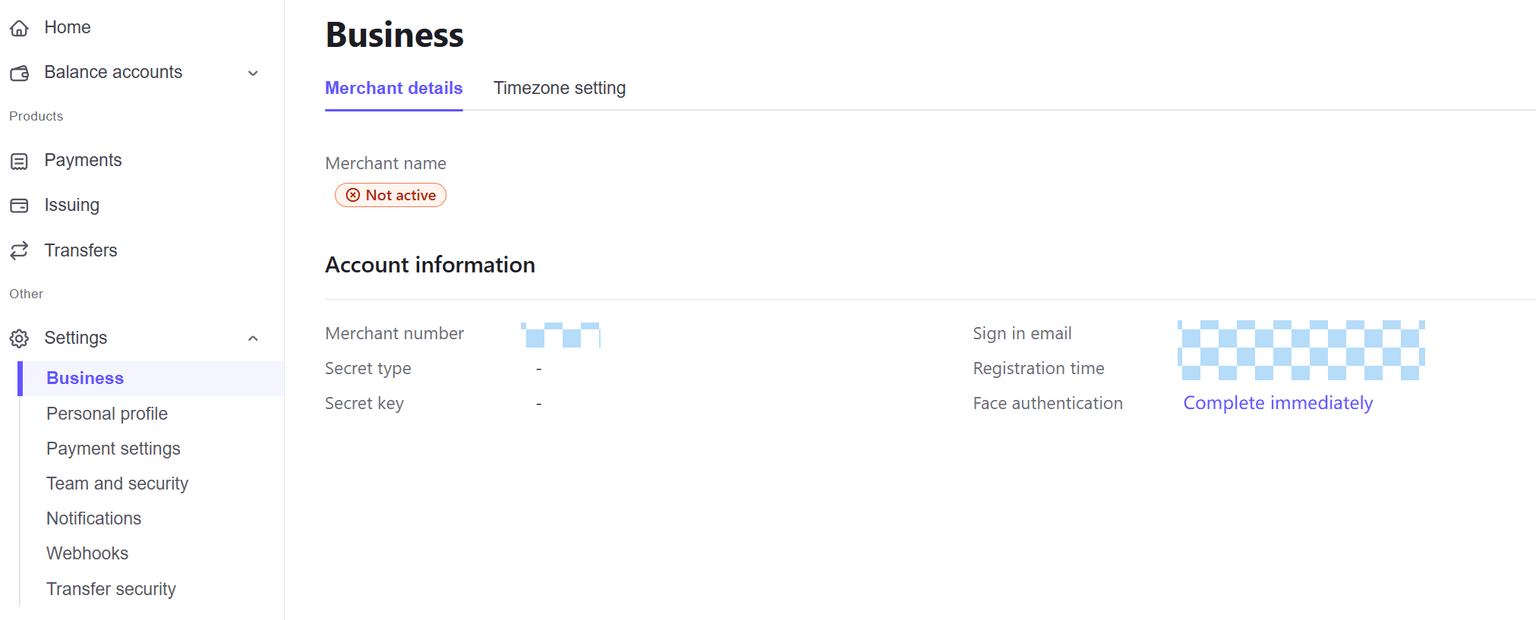
Account Information Description
| Field | Description |
|---|---|
| Merchant No | Your unique merchant identifier, used for identity recognition in API requests |
| Merchant Name | Your company/merchant name |
| Login Email | Merchant Portal login email |
| Status | Current merchant status (Not Activated/Activated) |
| Secret Type | Key type (e.g., SHA256) |
| Secret Key | Key for signature verification, please keep it safe |
| Registration Time | Account registration time |
Important: The
Secret Keyis an important credential for making API calls. Please keep it safe and do not disclose it to others.
Integration Preparation
Before starting technical integration, please ensure you have prepared the following information:
| Required Information | Location | Purpose |
|---|---|---|
| Merchant No | Settings → Business → Merchant details | API request identity |
| Secret Key | Settings → Business → Merchant details | Request signature verification |
| appId | Settings → Payment Settings → App Management | Application identifier |
| Domain Whitelist | Contact technical support to add | Request source verification |
Integration Method Selection
Onerway provides three integration methods. Please choose according to your business needs:
| Integration Method | Complexity | Applicable Scenarios | Detailed Documentation |
|---|---|---|---|
| Checkout Mode | Low | Quick launch, no need to handle sensitive card information | Checkout Integration Guide |
| SDK Mode | Medium | Embed payment in your own pages, customize UI | SDK Integration Guide |
| API Direct | High | Highly customized, complex business logic | API Integration Guide |
If you're not sure which method to choose, it is recommended to start with Checkout mode. You can upgrade to other modes as needed later.
Environment Configuration
Sandbox Environment (Testing)
| Configuration | Value |
|---|---|
| API Domain | https://sandbox-api.onerway.com |
| Merchant Portal | https://sandbox-merchant.onerway.com |
Production Environment
| Configuration | Value |
|---|---|
| API Domain | https://api.onerway.com |
| Merchant Portal | https://merchant.onerway.com |
Recommendation: Complete all testing in the sandbox environment first, then switch to the production environment after confirming everything is correct. When switching, you need to change the domain and corresponding merchant information (merchant number, key, appId).
Request Signing
All API requests require signature verification. Onerway uses the SHA256 algorithm for signing.
Signing Steps
- Prepare Signature String: Concatenate parameters according to the API documentation requirements
- Calculate Signature: Perform SHA256 calculation on the signature string using the
Secret Key - Add Signature: Add the calculated signature value to the request
Signature Example (Pseudocode)
signString = merchantNo + orderNo + amount + currency
signature = SHA256(signString + secretKey)
For specific signing rules, please refer to Onerway API DocumentationPayments API
Testing Tools
Onerway provides Apifox online testing tools, including sample requests for common API interfaces, allowing you to quickly verify API calls.
Click to Access Apifox Testing ToolsPayments API
Webhook Configuration
To receive asynchronous notifications such as payment results, you need to configure Webhooks:
- Log in to the Merchant Portal
- Click Settings → Webhooks
- Add your notification receiving address
- Select the event types you need to receive
- Save configuration
Processing After Receiving Notifications:
- Verify the signature to ensure notification authenticity
- Update order status based on notification content
- Return success response (HTTP 200)
FAQ
Q: Can the Secret Key be reset?
A: Yes. If the key is leaked or needs to be changed, please contact technical support to reset the key. After resetting, please update the key configuration in your system promptly.
Q: Are the sandbox and production environment keys the same?
A: No. The sandbox and production environments are completely independent, each with its own merchant number and key. Please pay attention to use them correctly.
Q: How do I get the appId?
A: After the onboarding review is approved, the system will automatically create an application. You can view the appId in Settings → Payment Settings → App Management.
Q: What should I do if the API request fails with a signature error?
A: Please check the following:
- Confirm the key used matches the environment
- Confirm the signature string concatenation order is correct
- Confirm UTF-8 encoding is used
- Confirm the SHA256 calculation is correct
Q: What test cards can be used for sandbox testing?
A: Please refer to the test card list in the API documentation, or contact technical support for test card information.